Author: Lifestyle & Wellness Desk

Join-the-2024-Basic-Education-in-Nigeria-Bootcamp-BEN-B-1280x720.jpg

2min14870
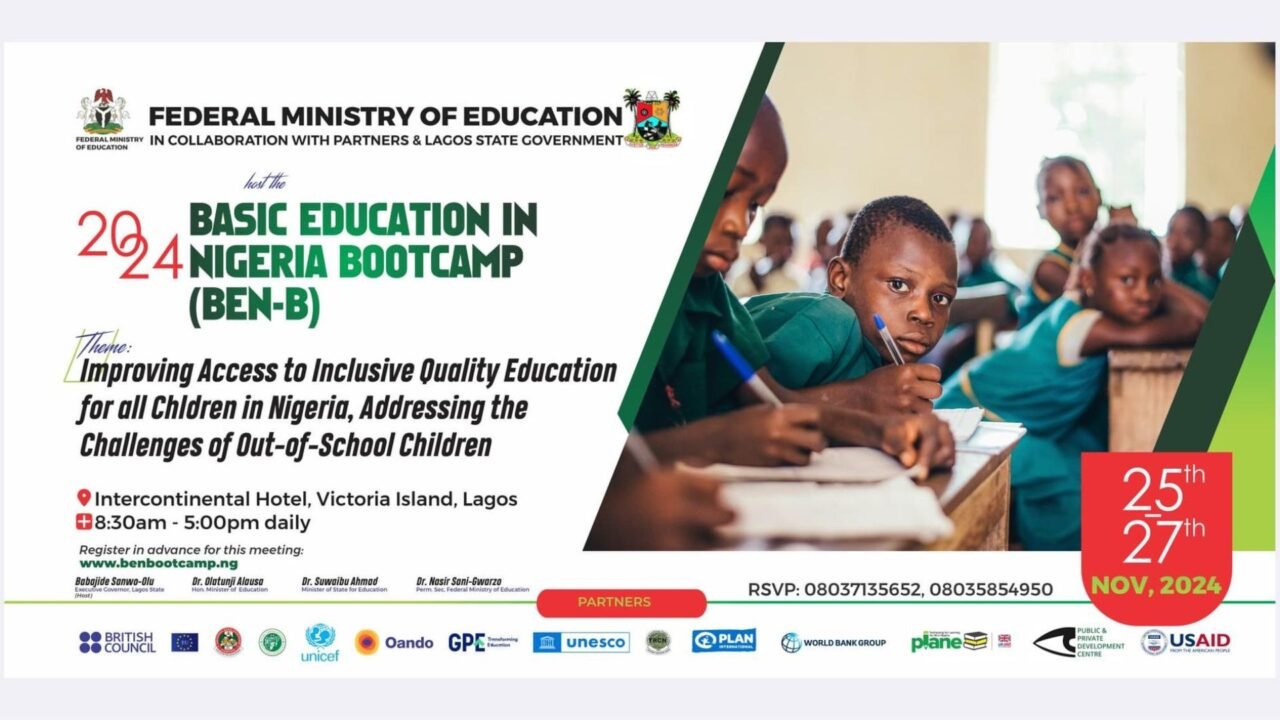
Event Details: Theme: Improving Access to Inclusive Quality Education for All Children in Nigeria, Addressing the Challenges of Out- of-School Children Date: November 25–27, 2024 Time: 8:30 AM – 5:00 PM daily Venue: Intercontinental Hotel, Victoria Island, Lagos, Nigeria. Hosts: Federal Ministry of Education in collaboration with Lagos State Government and other partners Event Overview: The Basic Education in Nigeria Bootcamp (BEN-B) is a significant gathering aimed at tackling the challenges in Nigeria’s education sector, especially focusing on inclusive education and addressing out-of-school children. This year’s bootcamp will feature thematic areas such as: Data Repository and its impact on education policy. Strategies for addressing out-of-school children. Teacher training and development. Skill development and acquisition for youths.   Keynote Speaker: His Excellency, Babajide Sanwo-Olu, Executive Governor of Lagos State. Lead Paper Presenter: Emeritus Prof. Pius Augustine Ike Obanya. Participation: Physical attendance: 235–300 participants. Virtual participation: Unlimited. Why Attend? This bootcamp offers an opportunity to network with government officials, development partners, private sector representatives, educators, and civil society organizations. Participants will explore innovative solutions to challenges in the basic education sector and identify strategies to foster collaboration among stakeholders. Registration: Visit www.benbootcamp.ng to register in advance. Partners: British Council, UNICEF, Plan International, World Bank Group, USAID, and more.

Gamification-in-Learning-Turning-Study-into-Play-1280x720.jpg

6min11600
Imagine a classroom where learning feels less like a chore and more like an adventure. Where solving math problems unlocks treasure chests, mastering grammar helps build virtual kingdoms, and history lessons turn into time-travel quests. This is the magic of gamification in education; a revolutionary approach that blends play with study, making learning engaging, interactive, and, most importantly, fun. What is Gamification in Learning? Gamification involves integrating game-like elements such as points, rewards, leaderboards, and challenges into educational content. It doesn’t mean turning classrooms into video game arcades but rather leveraging the motivational tools of games to encourage participation, engagement, and retention in learning. At its core, gamification taps into a universal truth: humans are naturally drawn to challenges, rewards, and achievements. When applied thoughtfully, it transforms mundane tasks into exciting experiences that spark curiosity and foster a love for learning. How Gamification Works in Education Platforms using gamification principles have proven that study and play can coexist harmoniously. They inspire students to approach their studies with the same enthusiasm they bring to their favorite games. Let’s explore a few standout examples: 1.   Kahoot! Kahoot! has turned quizzes into a thrilling competition. Teachers use the platform to create interactive quizzes on any topic. Students compete in real time, answering questions on their devices while a leaderboard tracks performance. The vibrant interface and time-based scoring create a game-show atmosphere that transforms revision sessions into something students eagerly anticipate. Impact: Research has shown that Kahoot! significantly boosts student engagement and motivation. The instant feedback and playful competition foster active participation, even among typically disengaged learners. 2.   Duolingo Duolingo is a gamified language-learning app that has millions of users worldwide. Through bite-sized lessons, users earn points, unlock levels, and maintain streaks. With its cartoon mascot cheering learners on and progress bars tracking goals, Duolingo makes learning a new language feel like a personal quest. Impact: The app’s game-inspired design encourages learners to stick with it longer, making language acquisition less intimidating. Its reward system motivates users to return daily, promoting consistency (a critical factor in mastering a language). 3.   Minecraft: Education Edition Minecraft: Education Edition allows students to explore, build, and create within a virtual world while learning key concepts in subjects like history, coding, and science. For example, students can construct ancient civilizations in history class or simulate chemical reactions in a virtual lab. Impact: Minecraft fosters creativity, critical thinking, and collaboration. Teachers report that students are more engaged and better able to retain information when lessons are tied to hands-on activities in the game. Why Gamification Works Gamification resonates with students because it mirrors the mechanics of the games they already love. Here’s why it works so well: Boosts Motivation: Game elements like rewards and progress tracking provide a sense of achievement, encouraging students to keep going. Encourages Healthy Competition: Leaderboards and challenges tap into students’ competitive spirit, driving them to perform better. Fosters Active Learning: By turning passive tasks into interactive experiences, gamification ensures students are actively engaged in their learning. Improves Retention: Concepts learned in a fun, engaging context are more likely to stick. The Challenges of Gamification While gamification is transformative, it’s not without challenges. Over-reliance on rewards can sometimes undermine intrinsic motivation, where students learn for the sake of learning. Teachers must strike a balance, ensuring the educational objectives remain at the forefront. Additionally, access to technology can be a barrier in some regions. Schools must find ways to integrate gamification equitably to ensure all students benefit. The Future of Gamified Learning As technology evolves, gamification in education will only grow more sophisticated. Virtual reality (VR) and augmented reality (AR) are already paving the way for fully immersive learning experiences, where students can “walk” through the human body in biology or “visit” historical landmarks in real time. Gamification doesn’t just make learning enjoyable; it redefines how students interact with knowledge. By turning study into play, it ensures that education is not just something students endure but something they actively embrace. The question is no longer whether gamification belongs in education. it is how we can maximize its potential to inspire a generation of learners who see study not as work but as an adventure waiting to be explored.

The-Science-of-Connection-Why-We-Need-Each-Other-1280x720.jpg

5min9580
Humans are wired for connection. From the moment we are born, we seek bonds that shape how we learn, grow, and thrive. But connection isn’t just an emotional need, it is also a foundation for effective education and lifelong learning. In today’s world, where screens often replace face-to-face interactions, we must rethink how we build connections in education. Whether in classrooms, workplaces, or communities, fostering meaningful relationships is key to creating environments where individuals can truly flourish. Let’s explore the science of connection and how it fuels education and personal growth. Why Connection Matters: The Science Behind It The need for connection is rooted in biology. Here’s how: Our Brains Thrive on Relationships: Positive relationships release oxytocin, a “bonding hormone” that reduces stress and enhances trust. strong connections improve focus, memory, and overall cognitive performance, making learning more effective. 2.   Emotions and Learning Are Linked: Studies show that students learn better when they feel safe, supported, and valued. Connection creates an emotional foundation that boosts engagement and motivation. 3.   Social Learning Is Powerful: Humans naturally learn from each other through observation, imitation, and collaboration. Relationships amplify this process, turning education into a shared experience. Building Connection in Education: What We Can Do For Teachers and Educators: Create a Safe Space: Students are more likely to engage when they feel respected and heard. Start with simple actions like learning their names, showing empathy, and celebrating their efforts. Encourage Collaboration: Group projects, peer mentoring, and team activities help students connect while building teamwork skills. 2.   For Parents and Guardians: Be Involved: Staying connected to your child’s learning journey—attending school events, discussing their day, or helping with projects—shows you care. Model Healthy Relationships: Children learn connection skills by watching how adults interact. Be intentional about kindness, communication, and patience. 3.     For Students and Learners: Participate Actively: Join discussions, ask questions, and engage with peers. Building relationships in school or other learning environments makes the experience more rewarding. Support Each Other: Helping classmates or working in teams strengthens bonds and improves learning outcomes for everyone. Life Lessons from Connection Connection isn’t just about building relationships, it is about shaping values and perspectives. When students connect with teachers, mentors, and peers, they learn essential life skills like empathy, communication, and teamwork. For example: A student working with a team on a school project learns how to listen, compromise, and solve problems collectively. A teacher mentoring a struggling student demonstrates the value of kindness and persistence. Parents engaging in their child’s school life show that education is a shared journey, not a solo task. These lessons extend far beyond the classroom, preparing students to succeed in life. How Edupreneur Champions Connection At Edupreneur, we believe in education that nurtures the whole person: academically, socially, and emotionally. By focusing on connection, we create a community where students and educators inspire one another. Our mission is to build bridges: Between learners and their goals. Between teachers and their students. Between education and the wider world. Because when we truly connect, we don’t just learn—we transform.

Why-Hydration-Matters-Simple-Ways-to-Drink-More-Water-1280x720.jpg

5min30510
Water is life. It powers every cell in our bodies, keeps our minds sharp, and ensures we stay healthy and energized. Yet, many people overlook the importance of staying hydrated, especially during heatwaves when our bodies need water the most. With rising global temperatures, understanding why hydration matters and how to stay hydrated is more important than ever. Let’s dive into how water supports our bodies and simple tips to drink more of it every day. Why Is Hydration So Important? Our bodies are made up of about 60% water, and this liquid gold plays a vital role in almost every bodily function. Here’s how it works: 1.     Regulates Body Temperature: Water helps cool us down when it’s hot. Through sweating, the body releases heat, but without enough water, this natural cooling system doesn’t work efficiently, leading to heat exhaustion or even heatstroke. 2.     Supports Organs and Systems: Brain: Even mild dehydration can affect focus, memory, and mood. Ever felt cranky or foggy? That’s your brain signaling it needs more water. Heart and Muscles: Water keeps blood flowing smoothly, reducing strain on the heart and improving muscle function. 3.     Flushes Toxins: Water helps the kidneys filter waste from the body. Without enough water, these toxins can build up, causing health issues like kidney stones. 4.     Boosts Energy and Metabolism: Proper hydration supports digestion and keeps energy levels steady throughout the day. The Danger of Heatwaves As heatwaves become more frequent due to climate change, the risk of dehydration rises. Prolonged exposure to high temperatures means we lose more water through sweat. If this isn’t replaced, dehydration can quickly set in, leading to: Dizziness and Fatigue Muscle Cramps Heat Exhaustion or Heatstroke Children, the elderly, and those with active lifestyles are particularly vulnerable. Staying ahead of dehydration isn’t just a health tip: it is a survival strategy. How to Stay Hydrated: Simple and Practical Tips Start Your Day with Water: Before you reach for your coffee or tea, drink a glass of water. It jumpstarts your hydration and wakes up your system. Carry a Water Bottle Everywhere: Keep water handy while working, commuting, or running errands. A reusable bottle can be your best companion. Add Flavor to Your Water: If plain water feels boring, add slices of cucumber, lemon, or mint for a refreshing twist. Set Reminders: Use alarms or hydration apps to remind yourself to drink water throughout the day. 5.   Eat Hydrating Foods: Include fruits and vegetables like watermelon, oranges, cucumber, and lettuce in your meals: they are packed with water. 6.   Drink Before You Feel Thirsty: Thirst is a late signal of dehydration. Aim to sip water regularly, even if you don’t feel thirsty. 7.   Watch Your Urine Color: Pale yellow urine means you’re well-hydrated. Dark yellow or amber is a sign to drink more water. 8.   Cool Down Smartly: During heatwaves, avoid outdoor activities during peak sun hours, and always drink extra water before and after exercising. Hydration Isn’t Optional—It’s Essential In our warming world, staying hydrated is no longer just a health tip; it’s a vital habit for surviving rising heat and maintaining our well-being. Water isn’t just something we drink, it is what fuels our bodies to thrive. Let us make hydration a priority, not an afterthought. Remember, the next glass of water you drink isn’t just refreshing—it’s protecting your health.    

Unlocking-Curiosity-Why-Inquiry-Based-Learning-Matters-1280x720.jpg

5min19340
What if classrooms could inspire curiosity and creativity instead of just focusing on memorizing facts? Imagine students asking their own questions, exploring new ideas, and solving real problems that matter to them. This is what inquiry-based learning is all about. Inquiry-based learning is a teaching method where students take the lead in their learning. Instead of simply being told what to know, they ask questions, research answers, and discover solutions. This approach is exciting because it helps students develop skills they will use for the rest of their lives. What Is Inquiry-Based Learning? Inquiry-based learning puts students at the center of their education. It’s all about asking questions, finding answers, and learning through discovery. Instead of memorizing information, students explore ideas and understand how to solve problems on their own. It encourages curiosity and creativity. It helps students become better thinkers, problem-solvers, and team players, skills they need for success in today’s world. Why Is It Important? Builds Critical Thinking: Students learn how to think, not just what to Encourages Curiosity: It keeps learning fun and exciting because students explore topics they care Teaches Collaboration: Group projects teach teamwork and the importance of working Prepares for Life: Inquiry-based learning helps students face real-world challenges by solving problems step by step. In a world where information is everywhere, the real skill is knowing how to ask the right questions. That’s what inquiry- based learning teaches. How Does It Work? Inquiry-based learning often happens in five simple steps: Ask Questions: The teacher or students start with a big, open-ended question, like “How can we make clean water for everyone?” Explore: Students research, experiment, or talk to experts to find answers. Connect Ideas: They look at what they’ve learned and figure out how it all fits together. Reflect: Students think about what worked, what didn’t, and what they’ve learned. Share: Finally, they share their findings, like giving a presentation, making a poster, or creating a video. Using Inquiry-Based Learning in African Classrooms Many classrooms in Africa still focus on memorizing facts, but inquiry-based learning offers something different. It makes learning more fun and meaningful. For example: In history class, students could ask, “What events led to Nigeria’s independence?” In science, they might explore, “How can we create better ways to store food?” In literature, they could discuss, “What can African stories teach us about resilience and courage?” Even in schools with fewer resources, this approach works. Teachers can encourage students to ask questions about their own communities and look for solutions together. How Teachers Can Start Start Small: Use inquiry-based learning for one topic or project at a time. Ask Simple Questions: Use questions that relate to students’ lives, like their environment or daily experiences. Guide the Process: Help students find resources, organize their research, and share their results. Use Technology: Even basic tools like phones or free online resources can help students explore and share ideas. Let’s Rethink Education Inquiry-based learning gives students the chance to take charge of their education. They don’t just memorize facts; they learn how to think, solve problems, and explore the world around them. As teachers, parents, and leaders, we can inspire students to love learning by making it more meaningful and fun. Let’s prepare them not just with knowledge, but with the skills to ask great questions and solve real problems. After all, curiosity is what drives progress.

EdTech-for-Special-Education-Tools-that-Support-Inclusive-Learning-1280x744.jpg

6min4820
Special education is one area where technology is making a profound difference, providing tools that enable students with diverse learning needs to thrive in the classroom. These EdTech tools help students with physical, cognitive, and learning disabilities overcome challenges, allowing them to engage, learn, and express themselves more fully. Here’s a look at some essential EdTech tools that support inclusive learning for students with disabilities. Speech-to-Text Apps: Supporting Students with Writing or Motor Challenges. Speech-to-text technology transforms spoken words into text, helping students who struggle with writing due to motor challenges or dyslexia. With these apps, students can participate in written assignments, express their ideas clearly, and communicate more effectively. Many apps integrate with common platforms like Google Docs, so students can create written work using their voice. Examples: Dragon NaturallySpeaking: This software offers highly accurate speech recognition and adapts to individual voice patterns. Google Voice Typing: Available in Google Docs, this free tool provides a simple speech-to-text solution. How It Helps: Speech-to-text apps give students who face writing challenges a way to complete assignments independently, boosting their confidence and participation.   2.  Visual Timers and Organizers: Aiding Students with Autism or ADHD Time management and organization can be challenging for students with autism or ADHD. Visual timers and organizers break down tasks into manageable steps and provide visual cues to help students understand time allocation. These tools promote independence and reduce anxiety by offering a clear structure for daily activities. Examples: Time Timer: This visual timer uses color to represent time passing, helping students see how much time is left for a task. Choiceworks: This app helps students organize their day, plan routines, and stay on track with visual schedules. How It Helps: Visual timers and organizers help students focus, complete tasks, and transition smoothly between activities, creating a more predictable learning environment.   3.   Reading Support Apps: Tools for Students with Dyslexia or Visual Impairments. Reading support apps are designed to assist students with reading disabilities like dyslexia or visual impairments, offering features such as text-to-speech, dyslexia-friendly fonts, and customizable reading settings. These apps empower students to read at their own pace and access the same learning materials as their peers. Examples: Bookshare: An extensive library of accessible ebooks for individuals with reading barriers, allowing students to listen to or adjust the text for easier reading. Voice Dream Reader: This app supports text-to-speech and offers customization options for font, text color, and background to support students with dyslexia. How It Helps: Reading support apps make reading accessible to all students, enabling those with reading difficulties to independently engage with class materials and improve their literacy skills.   4.   Communication Boards and Augmentative and Alternative Communication (AAC) Devices For students with limited or no verbal communication abilities, AAC devices and communication boards provide ways to express thoughts and needs. These tools allow students to participate in conversations, answer questions, and engage socially, breaking down communication barriers. Examples: Proloquo2Go: A symbol-based communication app that helps nonverbal students create sentences and interact with others. TouchChat: Another AAC app that enables students to communicate by selecting words or symbols on a tablet or smartphone. How It Helps: AAC devices support students in communicating effectively, enhancing social inclusion and allowing them to interact more freely with teachers and peers.   5.   Mind Mapping and Note-Taking Tools: Enhancing Cognitive Support for Diverse Learning Needs Mind mapping and note-taking tools help students with memory, organization, or processing challenges. These apps allow students to organize ideas visually, making complex information easier to understand and recall. They’re particularly helpful for students with ADHD or learning disabilities. Examples: MindMeister: A mind-mapping tool that lets students visualize information and organize thoughts. Notability: An app that combines note-taking with multimedia options, enabling students to record audio notes and integrate visual elements. How It Helps: These tools enable students to organize their thoughts and ideas effectively, supporting memory retention and helping them study or complete projects independently.   Conclusion With the right EdTech tools, special education can be more inclusive, allowing students with disabilities to access and participate in learning in new ways. Technology helps break down barriers and empowers students with diverse needs, fostering independence, engagement, and a sense of belonging. By integrating these tools into the classroom, educators can create a supportive environment that enables every student to reach their potential.

Top-5-EdTech-Tools-That-Every-Educator-Should-Know-About-1280x744.jpg

6min10070
With so many tools available, it can be overwhelming for educators to know where to start. Whether you’re looking to streamline lesson planning, boost engagement, or simplify assessments, the right EdTech tools can make a huge difference in the classroom. Here’s a guide to five essential EdTech tools that every educator should know about, each selected for its versatility and ease of use. Google Classroom – Organizing and Sharing Resources Google Classroom is a powerful, user-friendly platform that helps educators organize and distribute class materials in one With Google Classroom, teachers can assign and grade homework, share resources, and communicate with students seamlessly. The platform integrates with other Google tools, like Google Docs, Sheets, and Slides, allowing for easy collaboration and sharing. Key Features: Assignment Management: Create, distribute, and grade assignments efficiently. Class Announcements: Post announcements to keep students informed and engaged. Paperless Workflow: Reduces reliance on printed materials, saving time and resources. Why Educators Love It: Google Classroom simplifies the organization of materials, making it easy for both teachers and students to access resources anytime, anywhere.   2.   Kahoot! – Making Learning Fun with Quizzes and Games Kahoot! is an interactive quiz platform that turns lessons into games, making learning fun and engaging. Teachers can create quizzes, surveys, and polls to assess students’ understanding in a lively Kahoot! is particularly popular for review sessions or introducing new concepts in an interactive way. Key Features: Quiz Creation: Create custom quizzes or choose from a library of existing ones. Real-Time Feedback: See student responses instantly for a quick understanding check. Game-Based Learning: Adds an element of competition, boosting motivation and engagement. Why Educators Love It: Kahoot! breaks the monotony of traditional assessments, creating a dynamic environment where students enjoy learning.   3.   Edmodo – A Social Network-Style Platform for Collaboration Edmodo brings the familiarity of social networking into the classroom, creating a collaborative space for students and Teachers can post assignments, hold discussions, and provide feedback, while students can ask questions, share ideas, and work on group projects. It’s a safe, controlled environment that encourages collaboration. Key Features: Assignment Posting and Grading: Manage assignments and give feedback all in one place. Discussion Boards: Engage students in class discussions, even outside of school hours. Parental Access: Allows parents to see assignments and grades, promoting transparency. Why Educators Love It: Edmodo fosters a sense of community, encouraging students to actively participate in their learning experience.   4.   Nearpod – Interactive Lessons with Real-Time Assessment Nearpod allows educators to create interactive lessons with quizzes, polls, and multimedia It’s designed for real- time engagement, enabling teachers to gauge student understanding as the lesson unfolds. Nearpod can be used for in-class activities, homework, or self-paced learning, adapting to the needs of both teachers and students. Key Features: Interactive Lesson Building: Incorporate videos, polls, and quizzes to create engaging lessons. Real-Time Assessment: Get immediate feedback on student comprehension. Virtual Reality Integration: Transport students to virtual field trips, enhancing the learning experience. Why Educators Love It: Nearpod’s versatility allows for dynamic lessons that keep students involved, with instant feedback to help teachers adjust instruction as needed.   5.   Quizlet – Flashcards and Study Sets for Self-Paced Learning Quizlet offers digital flashcards and study sets, helping students review key concepts independently or in groups. It’s a fantastic tool for reinforcing vocabulary, historical dates, scientific terms, and Quizlet’s interactive games and study modes make it especially useful for exam preparation. Key Features: Custom Flashcards: Create flashcards tailored to the curriculum or specific learning goals. Learning Games: Engage students through study games that reinforce material. Variety of Study Modes: Options like “Learn,” “Match,” and “Test” keep studying fresh. Why Educators Love It: Quizlet encourages students to take charge of their learning with flexible, self-paced study options.   Conclusion These EdTech tools are versatile and adaptable, supporting teachers across various subjects and grade levels. Whether you’re organizing class materials with Google Classroom, making learning interactive with Kahoot!, fostering collaboration through Edmodo, creating engaging lessons with Nearpod, or enhancing student review with Quizlet, these tools can transform the classroom experience. Encouraging educators to try just one of these can lead to significant improvements in their teaching, making learning more engaging and accessible for students.


Digital-Safety-102-Advanced-Tips-for-a-Safer-Online-Experience-1280x744.jpg

5min19530
In our first guide, Digital Safety 101, we covered the basics of staying safe online, from understanding digital footprints to setting privacy controls. Now, in Digital Safety 102, we dive into more advanced practices for those ready to deepen their digital safety skills. With the rise of sophisticated cyber threats like phishing scams and deepfake technology, it’s crucial to go beyond the basics. This guide provides practical tools to stay one step ahead and navigate the internet responsibly and securely.   1.   Recognizing and Avoiding Phishing Scams What is Phishing? Phishing is a tactic used by cybercriminals to trick people into revealing personal information, like passwords or credit card numbers, by pretending to be trustworthy sources. Phishing often appears as emails or messages from what seems like a legitimate organization. Tip: Teach students and adults to verify unexpected messages by checking the sender’s email address or URL, looking for misspelled words, or contacting the organization directly. Encourage them never to click on unfamiliar links or download attachments from unknown sources. 2.   Using Two-Factor Authentication (2FA) for Better Security Why 2FA Matters Two-Factor Authentication (2FA) provides an extra layer of security by requiring two forms of identification (usually a password and a code sent to your phone) to access accounts. This reduces the risk of unauthorized access, even if passwords are compromised. Tip: Show students how to set up 2FA on their accounts, particularly social media and email. Explain that even if someone gains access to their password, they can’t log in without the second form of identification, keeping their information safer. 3.   Managing Digital Footprints Actively Taking Control of Personal Data Digital footprints don’t just come from what we post; many websites and apps collect information in the background. Managing these settings allows students to minimize what is stored and shared. Tip: Walk students through checking privacy settings on their devices and apps. Encourage them to periodically review these settings to control who can see their information, what is shared publicly, and what apps have access to their data. 4.   Spotting Deepfakes and Misinformation Identifying Manipulated Media With the rise of AI, deepfake technology can create realistic but false images, videos, and audio. Students need to know how to spot manipulated media and understand the importance of checking sources. Tip: Encourage students to question media sources and research unfamiliar claims. Show them how to use reverse image search tools to check an image’s origin, teaching them to verify content before sharing. 5.   Creating Strong Passwords and Managing Them Securely Building Better Passwords A strong password is a critical defense against hacking. Passwords should be long, unique, and include a mix of letters, numbers, and symbols. Tip: Guide students in creating secure passwords and using password managers to keep track of them. Teach them the “passphrase” method (using random words as passwords) as a memorable and effective way to secure accounts. 6.   Practicing Good Data Hygiene Deleting Old Data and Devices Many devices and apps hold onto data long after they’re no longer used. Practicing “data hygiene” means regularly deleting unused apps, wiping old devices, and clearing browser history. Tip: Encourage students and families to conduct a “digital cleanup” every few months. Remind them to clear unused accounts, photos, and downloads that take up unnecessary space and could pose security risks. Conclusion: Towards a Culture of Digital Vigilance Digital safety is an ongoing journey. With the right tools and knowledge, students and families can feel more secure in the digital world. By adopting these advanced safety practices, they can protect their privacy, identify risks, and act responsibly online. Let’s keep moving toward a future where everyone feels empowered to navigate the internet safely.

Digital-Safety-101-Teaching-Students-to-Navigate-the-Online-World-Responsibly-1280x744.jpg

5min21610
In today’s world, students are more connected than ever, with smartphones, social media, and a wide array of apps just a tap away. While the internet provides incredible learning and social opportunities, it also presents challenges like cyberbullying, privacy risks, and the lasting impact of digital footprints. Teaching young people to navigate these challenges responsibly is essential for their safety and well- being. Here’s how we can empower students to be smart and safe digital citizens. 1.   Understanding the Digital Footprint What is a Digital Footprint? A digital footprint is the trail of information we leave online, from social media posts to comments, photos, and even search history. Students should understand that what they post online can last forever and may be seen by future employers, colleges, or others. Tip: Encourage students to think carefully before posting. Ask them, “Would you be comfortable if your parents, teachers, or future employer saw this post?” This perspective can help them consider the potential long-term impact of their online actions. 2.   Privacy Matters: Protecting Personal Information Staying Safe Online Many apps and websites request personal information that, if shared carelessly, could lead to identity theft or privacy breaches. Teaching students to safeguard details like their home address, phone number, and financial information is vital. Tip: Show students how to set privacy controls on their social media profiles. Reinforce the idea of only sharing personal information with people they trust, and encourage using secure, unique passwords for different sites. 3.   Dealing with Cyberbullying Recognizing and Responding to Cyberbullying Cyberbullying can take many forms, from hurtful comments and spreading rumors to harassment and exclusion. It’s crucial for students to recognize cyberbullying and understand how to respond if they or a friend are targeted. Tip: Encourage students to save evidence of any bullying, such as screenshots, and to speak with a trusted adult if they’re affected. Schools and parents can also create open, supportive spaces for students to discuss online issues without fear of punishment. 4.   Practicing Digital Etiquette Respecting Others Online Just as in real life, kindness and respect are key online. Practicing good digital etiquette helps maintain positive online spaces and reduces the chance of misunderstandings. Tip: Encourage students to pause and think before responding to others online, especially in emotionally charged situations. Remind them that it’s often better to address conflicts face-to- face or let emotions cool before responding. 5.   Balancing Screen Time with Offline Activities Healthy Screen Habits Spending too much time online can impact mental health and academic performance. Students should learn to balance their screen time with offline activities, such as sports, hobbies, and family time. Tip: Help students set personal limits on their screen time, perhaps with the help of apps or parental controls. Encourage them to prioritize activities that help them relax and recharge away from screens. 6.   Becoming Media Savvy Recognizing Reliable Information The internet is full of information, but not all of it is reliable. Teaching students to question sources and recognize fake news or biased information is essential for responsible online engagement. Tip: Use fun examples to show students how to identify credible sources and encourage them to cross-check information. This skill helps them become discerning digital citizens, equipped to handle the vast amount of information online. Conclusion: Fostering a Culture of Digital Responsibility Equipping young people with digital safety skills empowers them to navigate the online world confidently and responsibly. As parents, educators, and mentors, we have a role to play in guiding students through these digital challenges, fostering safe habits, and encouraging responsible online interactions. By fostering a culture of digital responsibility, we can help students make the most of the internet’s opportunities while minimizing its risks.

Lifestyle-No-2-1280x720.jpg

2min8870
For educators and parents balancing work and family life, maintaining healthy habits can be challenging. However, prioritizing nutrition and exercise is vital for overall well-being. Here are some practical tips: Track Your Income and Expenses Why? Knowing where your money goes each month helps you see spending patterns and identify where you can save. How? Use a budgeting app or a simple notebook to record all sources of income and expenses. At the end of each month, review your spending and see where adjustments can be made.   Set Clear Savings Goals Why? Setting specific goals makes saving more achievable and keeps you motivated. How? Define what you’re saving for—a rainy-day fund, new tech for school, or a big trip. Start with a small monthly target, like saving 5000 naira – 10,000 naira, and increase as you’re able. Use the 50/30/20 Rule What is It?  This budgeting rule divides your income into three categories: 50% for essentials (rent, food, utilities) 30% for wants (entertainment, dining out) 20% for savings and debt repayment How? Adjust these percentages to fit your lifestyle, but keep savings and essentials as priorities.   3.   Build an Emergency Fund Why? An emergency fund protects you against unexpected costs, like medical bills or car repairs. How? Start with a small goal—aim to save at least 1,000 naira. Try to set aside a little each month until you reach this safety net.   These budgeting tips make it easier to control spending, save for the future, and stay on track financially. Start small, stay consistent,  and watch your savings grow!